












The Choicer Voicer’s setup is deceptively small: no built-in songs, no built-in judges, no premade contestants waiting for you. Nearly everything a table finds funny about a session comes from a folder of audio clips someone dropped in beforehand, which makes The Choicer Voicer less a finished game show and more a chassis for building your own.
Worth knowing before anything else: The Choicer Voicer is a title you install on Windows or Linux through itch.io rather than something you click open on a page. There’s no shared multiplayer across separate locations either — everyone doing impressions needs to be sitting in the same room, passing a microphone or taking turns at one setup, which shapes the whole experience toward being a local party toy rather than something you queue into with strangers.
In its standard Studio mode, up to four players take turns hearing a short reference clip, then recording their own vocal attempt at matching it. Computer-controlled judges score each performance once it’s done, and the group moves through however many rounds a session is set to run. The scoring itself leans into the format’s game-show framing rather than pretending to be a technical vocal analysis — the point is the reaction in the room, not a precise grade.
Because Studio mode runs entirely on local turns, the actual comedy tends to come from watching a friend commit to a bad impression more than from chasing a high score. Groups that treat it purely as a competition tend to burn out on it faster than groups who use the judges’ verdicts as an excuse to argue and laugh.
What newer hosts consistently underestimate is how much a round depends on what’s actually in the folder of clips being used. A stack of instantly recognizable lines makes for an easy, loud session; a pack full of obscure or awkward audio changes the entire mood of the table without anyone touching a setting.
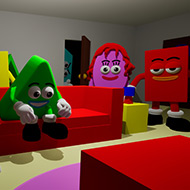
The game ships with very little playable content of its own — the intended workflow is installing packs, or making them. A pack can supply the audio clips, but separate packs also exist for contestants, judges, studio backdrops, and streamer-facing overlays, and each of those can be swapped independently of the others.
Making a clip pack is about as low-friction as it sounds: dropping audio files into a folder is enough to get them recognized by the game, no separate authoring tool required for the basic case. That low barrier is a big part of why groups end up with wildly different libraries from one another — a pack built around movie lines plays nothing like one built around a friend group’s inside jokes.
This is also where The Choicer Voicer diverges hardest from a typical party game: two households running it can end up with almost no overlap in what a session actually contains, since the judge panel, the host, the studio backdrop, and the clip pool are all independently replaceable pieces rather than a fixed package.
Separate from the round-based Studio format, Dub Mode has players record a multi-line performance that gets played back over video rather than scored in isolation. Instead of one short clip and one attempt, a Dub pack supplies a whole scene’s worth of dialogue for someone to voice, complete with captions, and the result plays back like an amateur redub of the source footage.
Dub Mode rewards a different skill than the quick-hit Studio rounds — matching pacing and tone across several lines in a row is harder than nailing one short burst, and players who are strong at one format aren’t automatically strong at the other. Groups that only ever touch Studio mode are missing a genuinely different half of what the game offers.
For anyone streaming a session, a Twitch-facing mode swaps the computer judges for the viewers themselves, turning chat commands into the scoring input. Some packs go further and are built specifically for this mode, handing viewers their own clips to vocalize alongside whoever’s on camera rather than only judging the person streaming.
This mode changes the social dynamic of a session more than any setting does — a panel of viewers reacting in real time behaves nothing like four friends passing a microphone around a living room, and hosts who lean into that difference tend to get more out of it than hosts who treat chat mode as a cosmetic reskin of Studio mode.
The most common first-session mistake isn’t about performing — it’s about setup. Microphone recording can be genuinely finicky, particularly on surround-sound configurations, and a group that hasn’t tested audio ahead of time often loses their first ten minutes to troubleshooting instead of playing. Running the built-in microphone check before anyone sits down solves most of this.
The second mistake is assuming the base install has enough content for a full night. It doesn’t, by design — treating pack installation as part of setting up the game, not an optional extra, is what separates a session that runs out of material in twenty minutes from one that comfortably fills an evening.
Effectively yes. The base game leans on installed or self-made packs for its clips, judges, and studio dressing, so a session built entirely on whatever ships by default will feel thin compared to one running even a single well-chosen content pack.
Studio mode supports up to four players taking turns in the same physical space, and Dub Mode works the same way for group scenes — but everyone needs to be together, since there’s no way to join a session remotely from a separate location.
Studio mode is short reference clips judged round by round, aimed at quick reactions and a running score. Dub Mode replaces that with a full multi-line scene played back over video once it’s recorded, judging pacing and character across a whole performance instead of a single burst.
The Choicer Voicer isn’t a game that hands you a finished show — it hands you a judge panel, a host, a studio, and a blank folder, and trusts a group to fill in the rest with whatever clips make them laugh hardest, whether that ends up running through Studio mode or a full Dub Mode scene.